
Introduction
One of my Friend told me that after leaving the job, she is facing a lot of problem in withdrawing her PF.
The same may have happened with you also in which your entire time would have been wasted.
Therefore, today I am telling you such a method of PF withdrawal in which your PF claim will be submitted online within 15 minutes.
Along with this we will also discuss further steps related to EPFO which are very important for you.
What Is PF Withdrawal?
In India, PF stands for Provident Fund.
Simply put, it refers to withdrawing the Provident Fund money accumulated by an employee.
If you are currently employed—or have previously worked—in the private or government sector, a portion of your salary is likely deducted for this fund every month.
Withdrawing this deducted amount is known as PF withdrawal.
PF withdrawals can be of two types:
- Partial Withdrawal – When you withdraw PF funds for purposes such as medical treatment, education, marriage, or housing.
- Full Withdrawal – This withdrawal can be made after retirement or under specific employment-related conditions.
Visit here– Explore more about Types of PF Withdrawal Method
Are PF and EPF the Same?
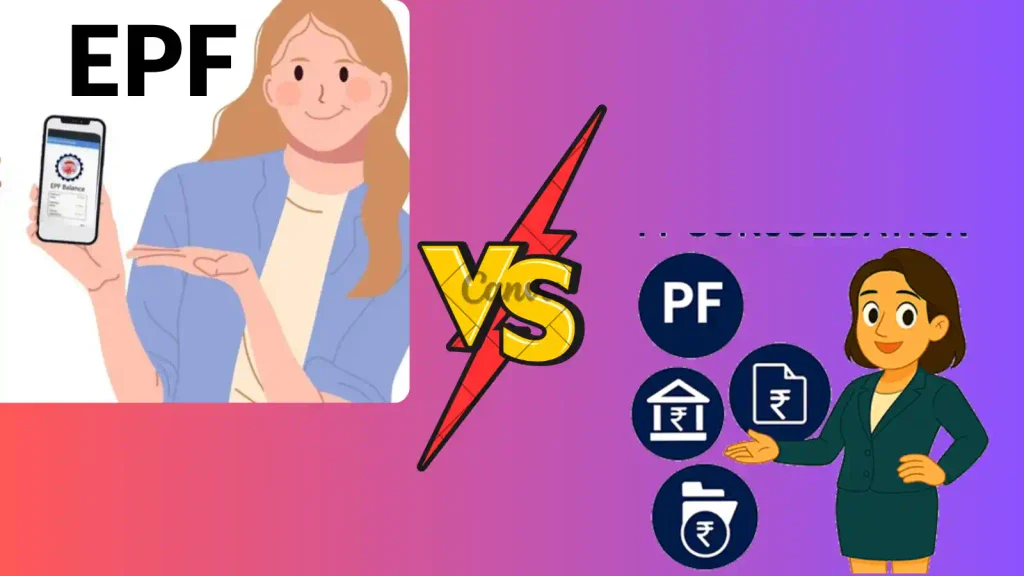
When we search for information about PF, we often come across the term EPF.
The terms PF and EPF have likely caused you a lot of confusion as well.
Like me, you might think they are different things, but that is not the case; PF (Provident Fund) and EPF (Employees’ Provident Fund) are actually the same.
What Are the EPFO Withdrawal Rules for 2026?
PF rules in India have been greatly simplified.
Under the EPF scheme, you can use your Provident Fund like a savings account and utilize it even after retirement.
These are the Key EPFO Withdrawal Rules in 2026:
- Minimum Membership– 12 months for most partial withdrawals.
- Withdrawal Categories– Three categories: Essential Needs, Housing Needs, and Special Circumstances.
- Maximum Partial Withdrawal– Up to 75% of the PF balance can be withdrawn.
- Minimum Balance Rule– At least 25% of the PF corpus must remain in the account.
- Unemployment Withdrawal– 75% can be withdrawn immediately after unemployment; the remaining 25% after 12 months.
- Marriage Withdrawal– Allowed up to 5 times during membership.
- Education Withdrawal– Allowed up to 10 times during membership.
Documents Required for PF Withdrawal
Withdrawing your PF after leaving a job is very easy.
You need certain essential documents to claim your Provident Fund.
These documents can be considered mandatory for PF withdrawal:
- Universal Account Number (UAN)
- Aadhaar Card
- Bank Account Details
- PAN Card
- Aadhaar-Linked Mobile Number
Apply Now for UAN for Free— Visit Here
How to withdraw PF Online Step by Step Process
If you have these documents, the PF withdrawal process will become even easier.
Today, I will share a method for claiming your PF that allows you to withdraw your Provident Fund in less than 15 minutes.
You simply need to follow these steps:
Step 1: Visit the Official Portal
As I always tell you, you should use the official website for any government-related task.
To withdraw your PF, you first need to visit the official EPFO portal.
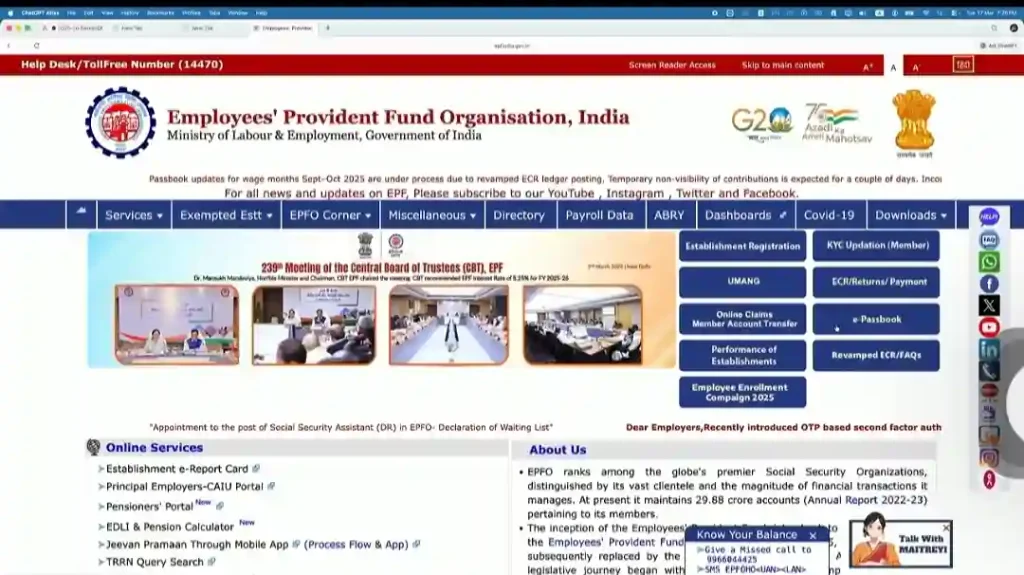
You can search for “EPFO” on Google to find the website, or simply click on this link.
Step 2: Log in to the EPFO Memeber Portal
Once you visit the website, you will see several options.
Among these options, you need to click on “KYC Updation (Member).”
After clicking this, you will see an interface with a login section on the side.
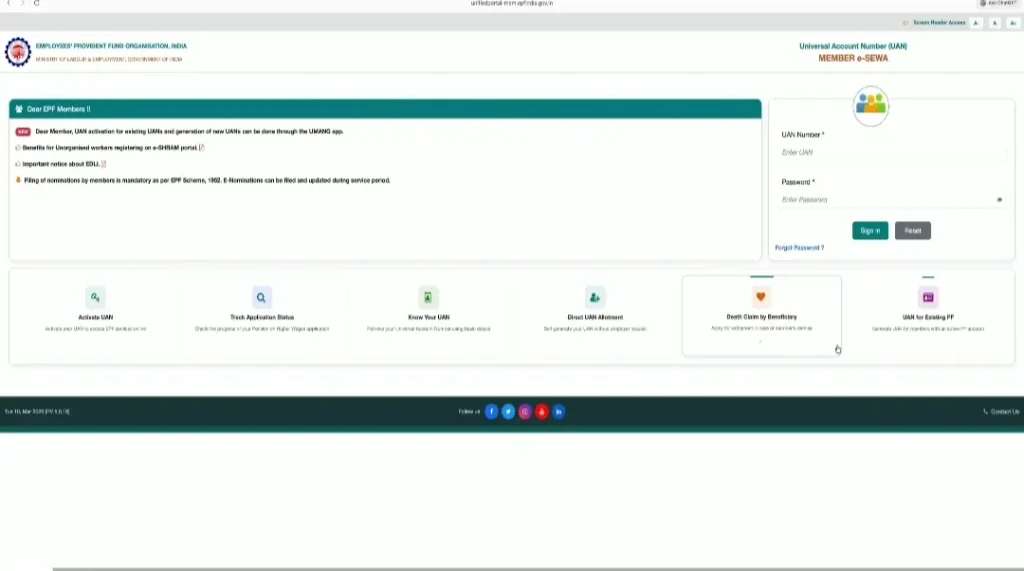
In this section, enter your UAN number and password to log in.
After logging in, a verification pop-up will appear.
Here, you need to enter the OTP to complete the verification.
Step 3: Check KYC of EPFO
KYC completion is essential for PF withdrawal.
After logging into the official portal, you will see an interface similar to this.
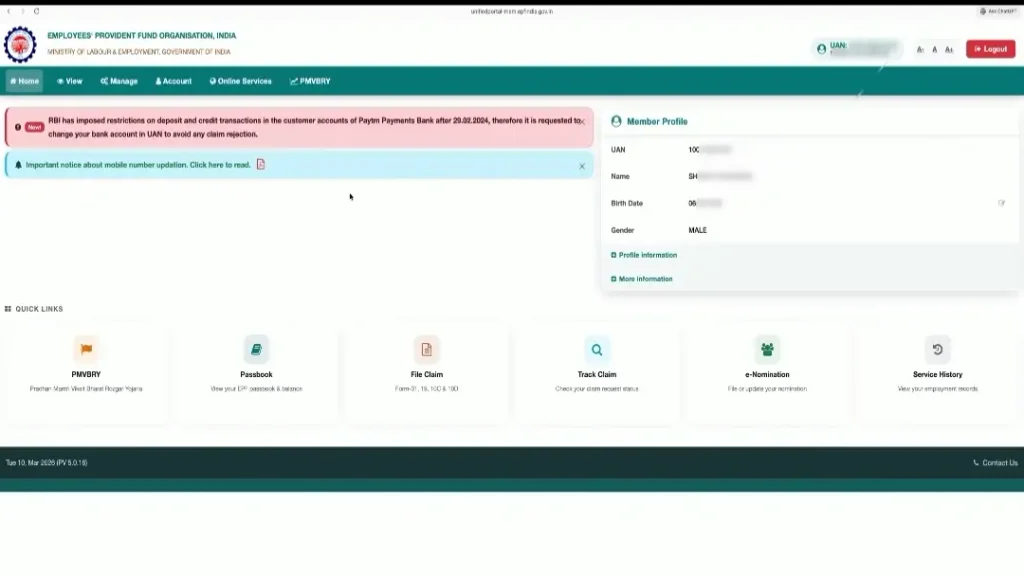
You will see a “Manage” section there.
Upon clicking “Manage,” you will see a “KYC” option; click on it.
Next, you will see the status of your Bank, PAN, and Aadhaar details.
If your KYC is already done, the status will show as “Approved.”
If it is not approved, simply enter your Aadhaar, bank, and PAN details to complete the KYC process.
Step 4: Online Services (Form Selection)
Now, you need to return to the login page and click on the ‘Online Services’ option.
After clicking this, you will see three options; select the first one: “Claim (Form 31, 19, 10C & 10D).”
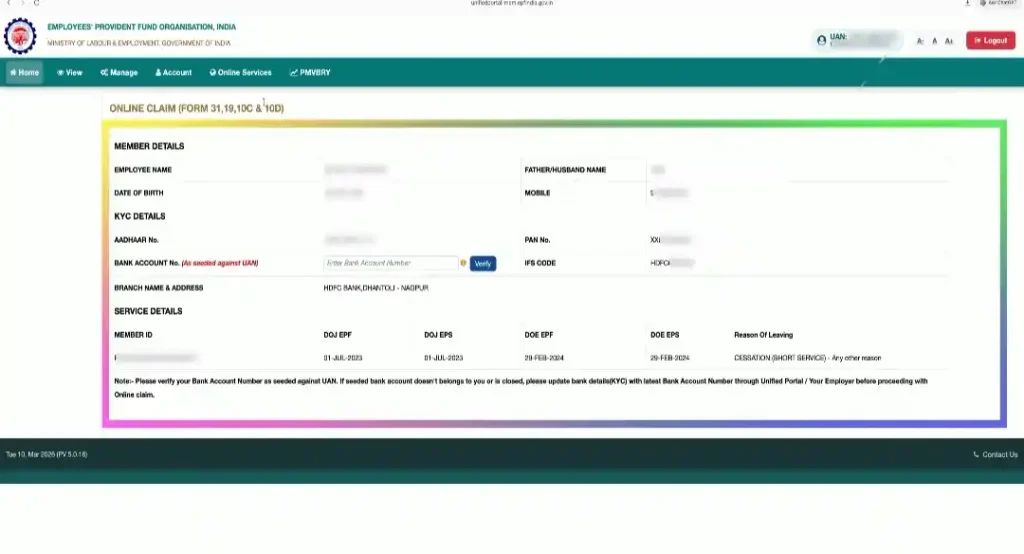
Once you select the first option, you will be directed to the next page, which will look something like this.
Step 5: Verify Bank Account No.
You will see a lot of details on this page.
You should see an option labeled “Bank Account No.”; enter your account number there and verify it.
After verifying, click on “Proceed for Online Claim.”
Step 6: Select Form
After completing the steps, you should see an interface similar to this:
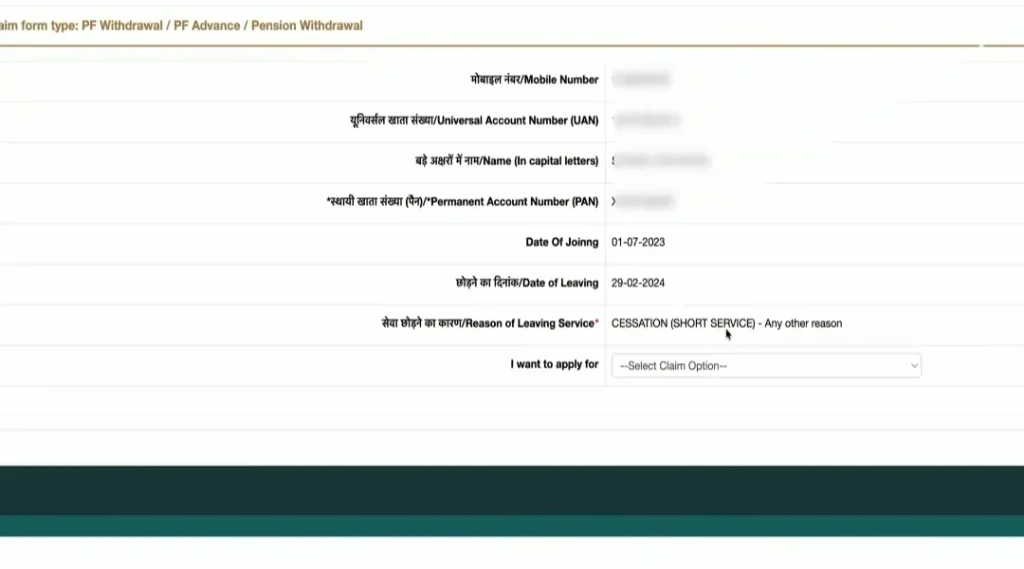
Here, you need to select the form:
- Online PF Withdrawal (Form – 19)
- Pension Withdrawal Only (Form – 10C)
- Scheme Certificate (Form – 10C)
- PF Advance (Form – 31)
For instance, if you only want to withdraw your PF, you should select Form 19 under the “I want to apply” option.
Step 7: Fill Address details and Submit Form
After selecting Form 19, scroll down a little.
You will see the ‘Employee Address’ section below.
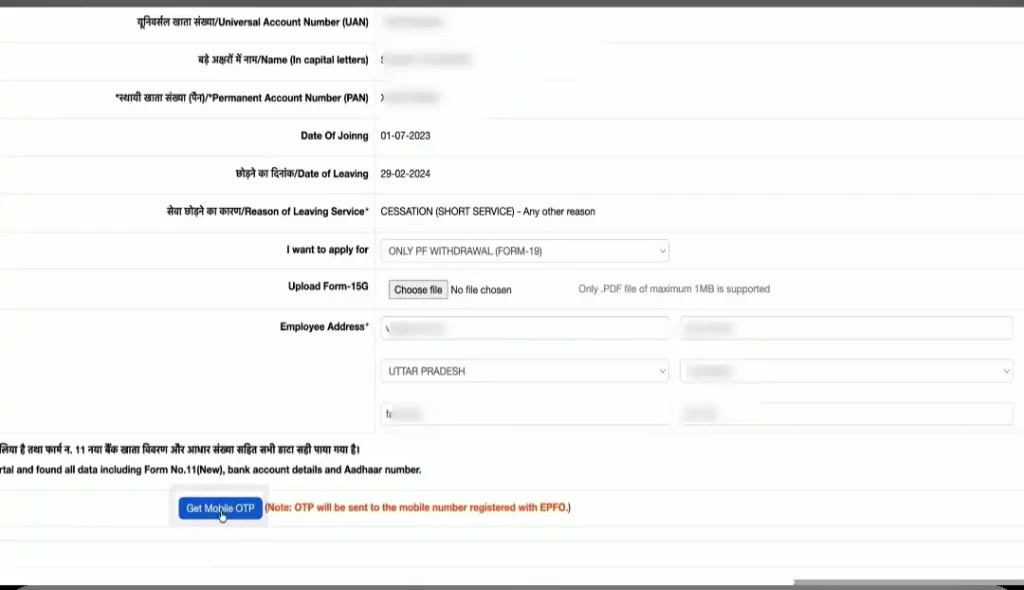
Enter your address details here, such as locality, street, state, district, city, and PIN code.
Next, click on the “Get Mobile OTP” option visible below.
After clicking this, you will receive an OTP; enter it and click ‘Submit’.
Then, click on “Submit Claim Form” again.
The PF withdrawal process is now successfully completed.
Step 8: Acknowledgement Reciept (Optional)
If you wish, you can download the receipt for your form by clicking the link shown below.
How to Claim EPF Amount Online Through UMANG App?
Just like making EPF claim is very easy, you can also claim this amount using UMANG App.
By using UMANG you can also avail EPF or PF withdrawal.
For this you have to download Umang which you can do by clicking on our link.→Download Here
After downloading this you have to login.
After logging in, you have to follow the exact same procedure which I told above.
How do I check my EPF balance online?
I also check my EPF balance this way.
There are several ways to check your PF balance, such as:
- Through the EPFO Member Portal
- Through the UMANG App
- Through SMS
- Through a missed call
The process for checking the balance via the UMANG app and the EPFO Member Portal is the same.
You can check your PF balance instantly by simply following this procedure:
Step 1: Open the UMANG app or the EPFO Member Portal.
Step 2: Search for EPFO services.
Step 3: Select ‘View Passbook’.
Step 4: Enter your UAN and verify using the OTP.
Step 5: Check your EPF balance and contribution details.
In my opinion, the best way to check your PF balance is via a missed call.
You simply need to call 9966044425 from the phone number linked to your UAN.
Immediately after the call, you will receive your PF balance details via SMS.
What is the new update of EPFO 2026?
The EPFO (Employees’ Provident Fund Organisation) in India has introduced several new updates.
The most significant change is the increase in the wage ceiling for all employees.
The wage ceiling has been raised from ₹15,000 to ₹25,000 per month.
While the EPFO has introduced this rule, it will be fully enforced starting from September 17, 2026.
Along with this, a few other new rules have also been introduced:
- More than 51 lakh additional employees are expected to come under mandatory EPFO coverage.
- Employees earning between ₹15,000 and ₹25,000 per month are now eligible for EPF, EPS, and EDLI benefits under the revised rules.
- Maximum EPS contribution has increased because it is now calculated on the revised wage ceiling of ₹25,000.
- The new changes strengthen retirement savings, pension benefits, and insurance coverage for salaried employees.
- EPFO is also continuing its digital transformation (EPFO 3.0) to provide faster and more user-friendly online services.
Latest Re-Neet Updates— Check NTA Reforms
What are the key changes in epfo pdf
It is crucial to be aware of the EPFO rules right now, especially for employees.
If you hold any kind of organized-sector job, these rules will affect you as well.
The EPFO rules will be officially enforced on September 17, 2026.
You can download the official EPFO PDF here.↓
Why is bank KYC getting rejected in EPFO?

There could be several reasons for the rejection of your EPFO request.
However, your Bank KYC is most commonly rejected due to the following reasons:
- Entering an incorrect bank account number.
- Entering an incorrect or outdated IFSC code instead of the updated details.
- The name you use might not match the name on your bank passbook and Aadhaar card.
- Your bank account might be inactive, closed, or frozen without your knowledge.
- You might have overlooked the fact that your Aadhaar card is not linked to your UAN.
Common PF Withdrawal Mistakes to Avoid
You might be looking to withdraw your PF and want to ensure the process goes smoothly without any issues.
People generally make the following mistakes when withdrawing PF—mistakes that you should avoid:
- Aadhaar & UAN Issues: Aadhaar is not linked or verified with your UAN.
- Incomplete KYC: PAN, bank account, or other KYC details are missing or unverified.
- Incorrect Bank Details: Wrong bank account number or IFSC code entered in the EPFO portal.
- Personal Information Mismatch: Name, date of birth, or other details do not match EPFO, Aadhaar, or bank records.
- Wrong Claim Form Selection: Choosing Form 19, Form 31, or Form 10C incorrectly based on your withdrawal type.wwaawaw
- 2 of Exit Not Updawated: Your previous employer has not updated your Date of Exit (DOE), making you ineligible for certain claims.
Most Important FAQs Of PF Withdrawal
Can I withdraw 100% PF amount?
Yes, in cases like retirement, permanent disability, retrenchment, or leaving India permanently.
What is PF withdrawal limit?
Up to 75% of the eligible PF balance can be withdrawn after 12 months.
What is PF withdrawal in EPFO?
PF withdrawal means claiming money accumulated in your EPF account under EPFO rules.
How many times can we withdraw PF advance?
Marriage: 5 times, Education: 10 times, Housing: 5 times during membership.
PF withdrawal time limit
EPFO generally settles eligible PF withdrawal claims within about 20 days after submission.
PF withdrawal new rules 2026 special circumstances
Members can withdraw under Special Circumstances without giving reasons, up to two times per financial year.
Conclusion
If you are an employee, understanding the PF withdrawal process is very important for you.
The process for withdrawing EPF or PF is extremely easy and simple.
By simply following the seven steps mentioned above, you can submit a PF withdrawal request in under 10 minutes.
If you have any queries related to this topic, please let me know in the comments.
“Your PF is not just a deduction from salary—it is your hard-earned financial security for the future“
Further Readings: