
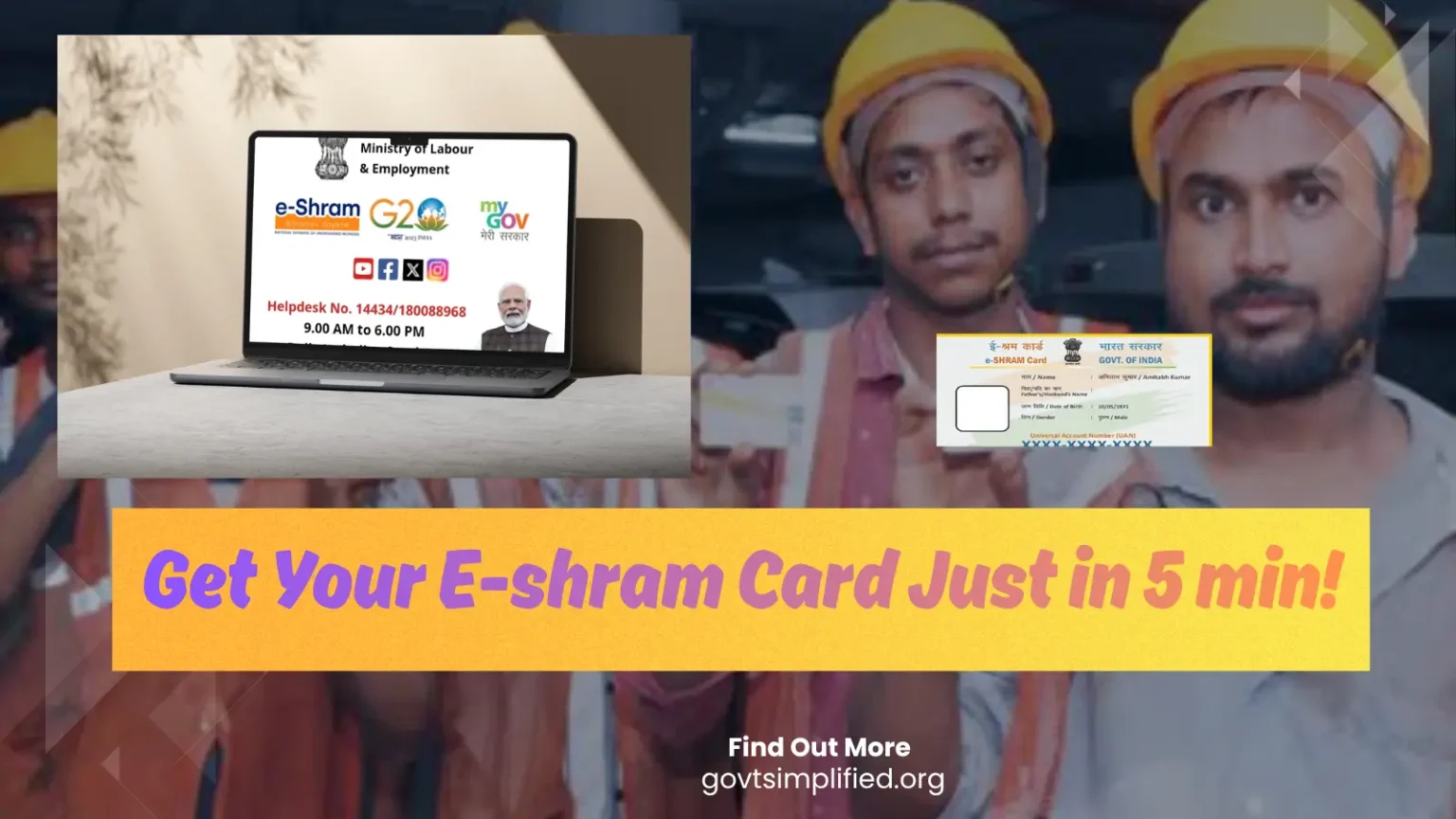
Introduction
If you are employed in any sector, you should possess a formal work identity.
India has an employed workforce of 600–640 million (Source), yet between 64 and 99 million of these workers do not possess an e-Shram card.
You might also fall into the category of unorganized sector workers; therefore, I have identified the best method for you to apply for an e-Shram card from the comfort of your home.
You may have many questions or doubts regarding the e-Shram card, but reading this article will clear up all your confusion.
“An E-Shram Card connects workers to opportunities and support.”
E Shram card is for what purpose
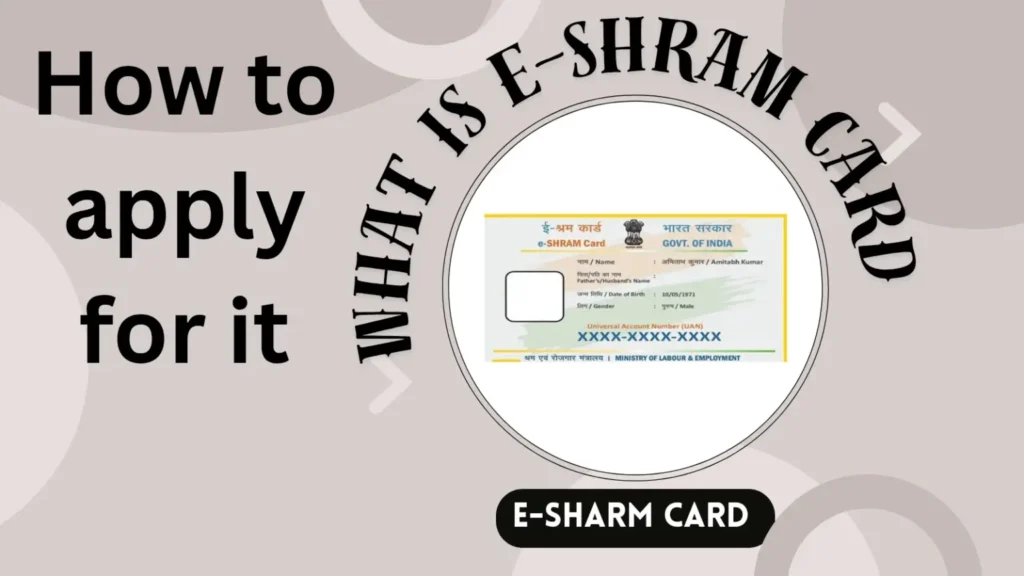
While having a workforce is crucial for any country, simply performing work-related tasks does not automatically classify you as an official worker.
Earlier, I also thought that the E Shram Card was an identity card.
When I did research, I realized that it is much more important than identity for unorganized workers.
The E Shram Card can be used to identify you or keep a record of it in government data.
This card provides you with a unique 12-digit Universal Account Number (UAN) that makes you eligible for government welfare and social security schemes.
These are some of the main purposes of the E Shram Card:
- To create your worker identity
- Helps the government identify eligible workers for welfare schemes
- To easily deliver social security benefits
- Support to skill development and employment opportunities
Who Can Apply for an E Shram Card?
Anyone can apply for an e-Shram card, provided the following conditions are met:
- You must be an unorganized sector worker.
- You must be between 16 and 59 years of age.
- You must not be a member of or linked to EPFO, ESIC, or the government-funded NPS scheme.
- You must possess an Aadhaar card linked to your mobile number.
The following individuals can apply for an e-Shram card: ↓
- Construction workers
- Agricultural workers
- Street vendors
- Domestic workers
- Drivers and helpers
- Electricians and plumbers
- Tailors and beauticians
- Migrant workers
- Delivery partners
- Gig and platform workers
- Self-employed workers
E shram card apply online step by step process
If you are genuinely serious about getting an e-Shram card made, you can apply by following the method I have outlined.
As I mentioned earlier, if you are between the ages of 16 and 59 and are not enrolled in EPFO, ESIC, or the government NPS, please follow these steps:
Step 1: Visit the Official Portal
I have always told you that for any government work you should always use its official form.
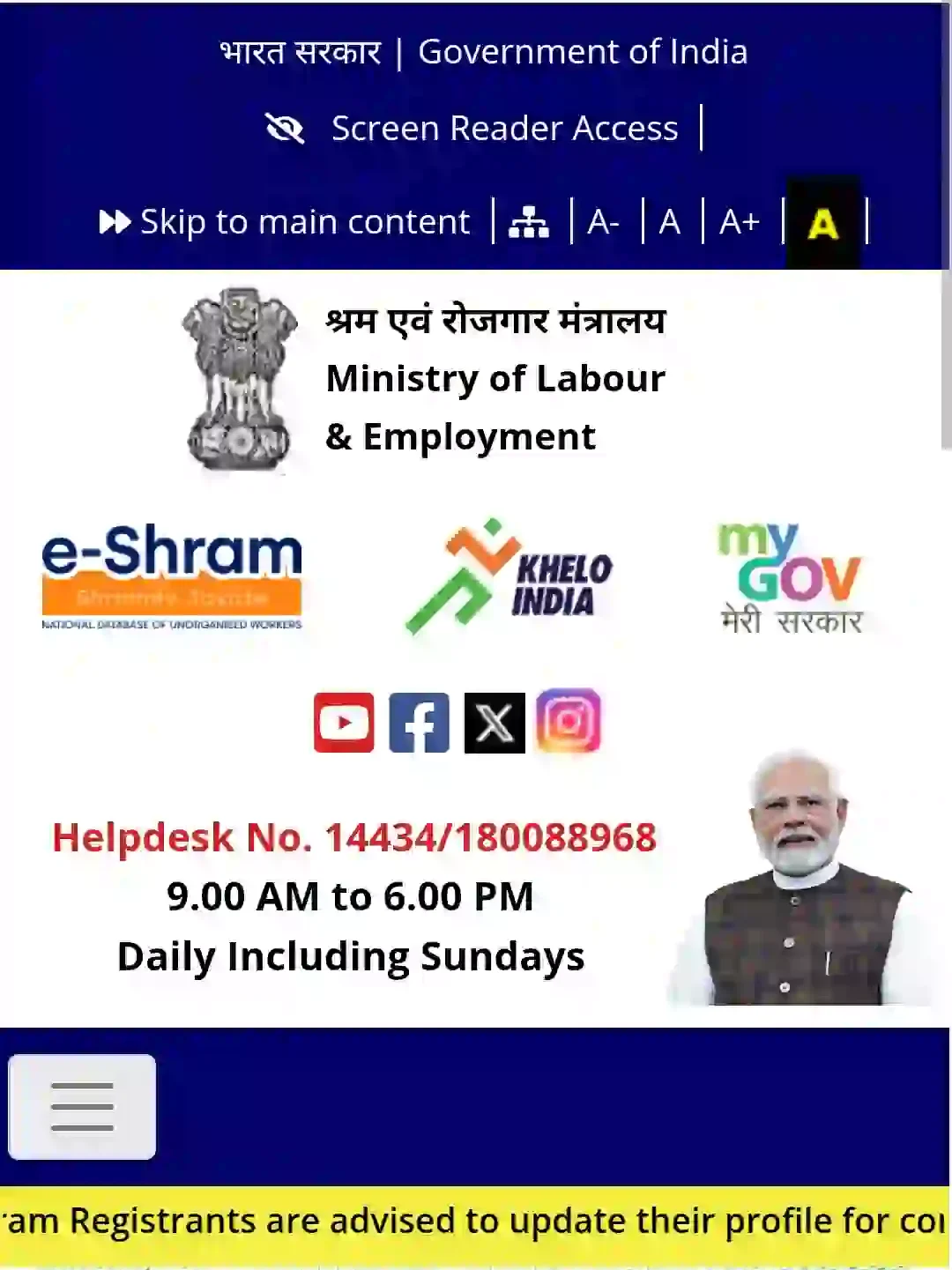
To apply for E Shram Card, you must first visit the official portal of E Shram Card “https://eshram.gov.in/“.
The official website of this Shram Card will be like this.
Step 2: Click “Register on e-Shram”
After coming to the official portal, you have to scroll down a bit.
Scroll down and you will see 5 sections. Like this
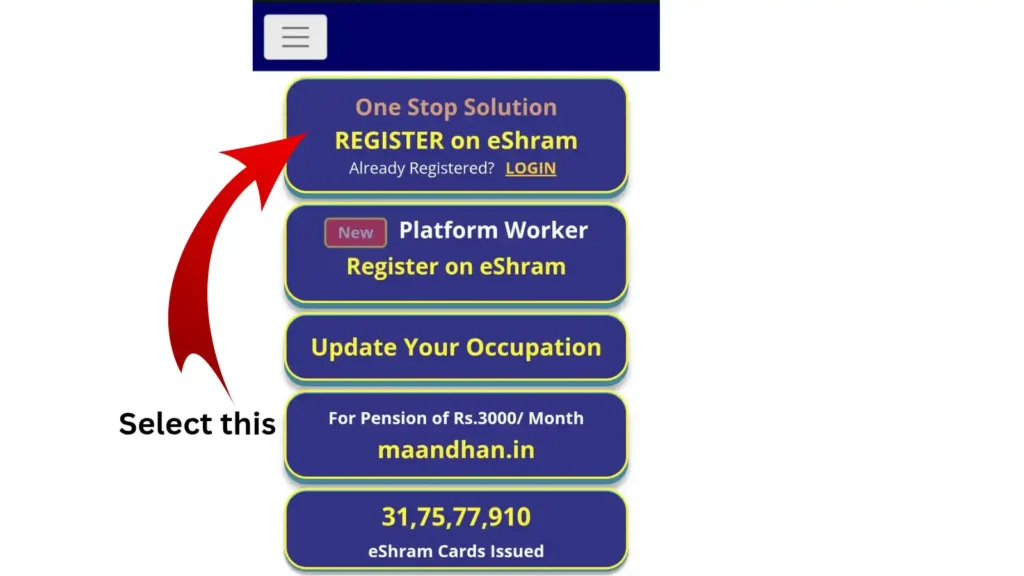
You have to click on the first section “Register on E Shram Card” or go to the next step.
Step 3: Enter Mobile Number
On this page, you need to enter the mobile number linked to your Aadhaar card.
After entering the number, fill in the Captcha code displayed on the screen into the corresponding box.
Select “No” in both the EPFO and ESIC sections located directly below the Captcha code.
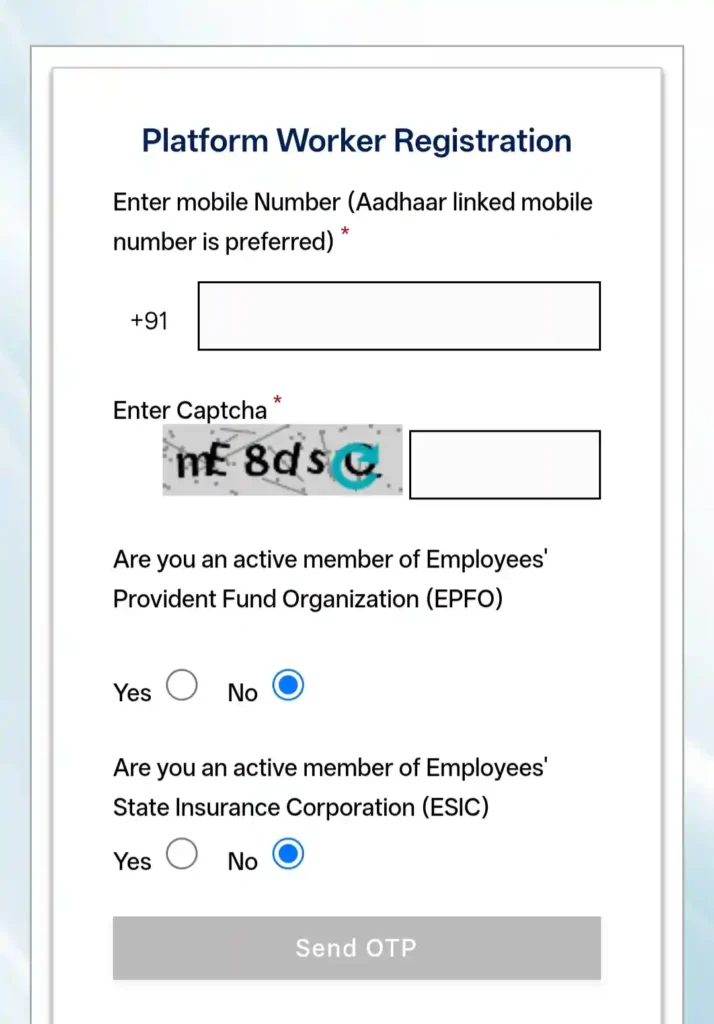
Next, click on “Send OTP.”
Note: If you are employed in a private job where PF and ESIC deductions are made, you may select “Yes.”
Step 4: Verify OTP
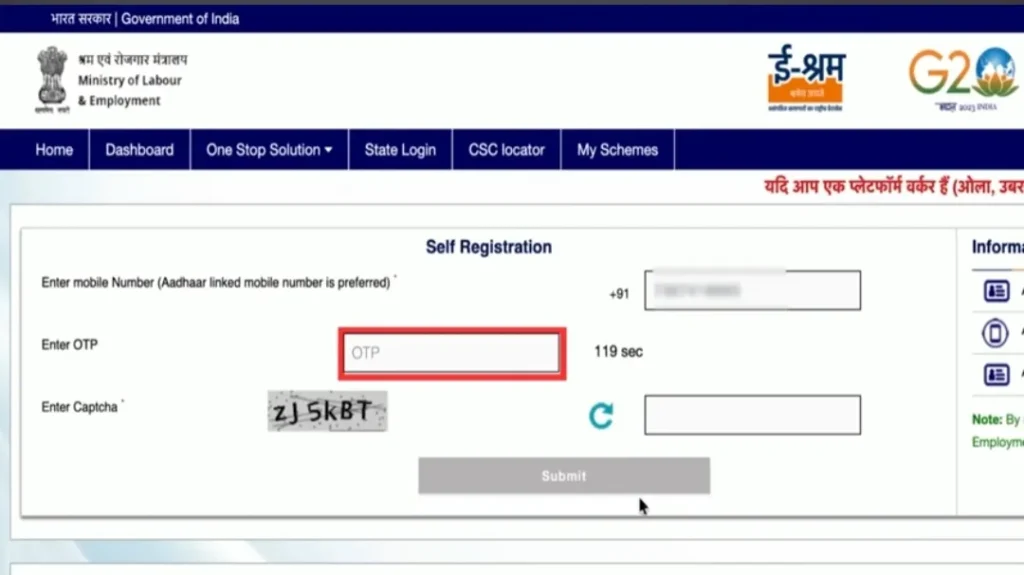
After selecting ‘Send OTP’, you will receive an OTP on your phone number; then, enter the captcha code again and click ‘Submit’.
Step 5: Enter Aadhaar Details
In this section, you will see an interface that looks something like this.
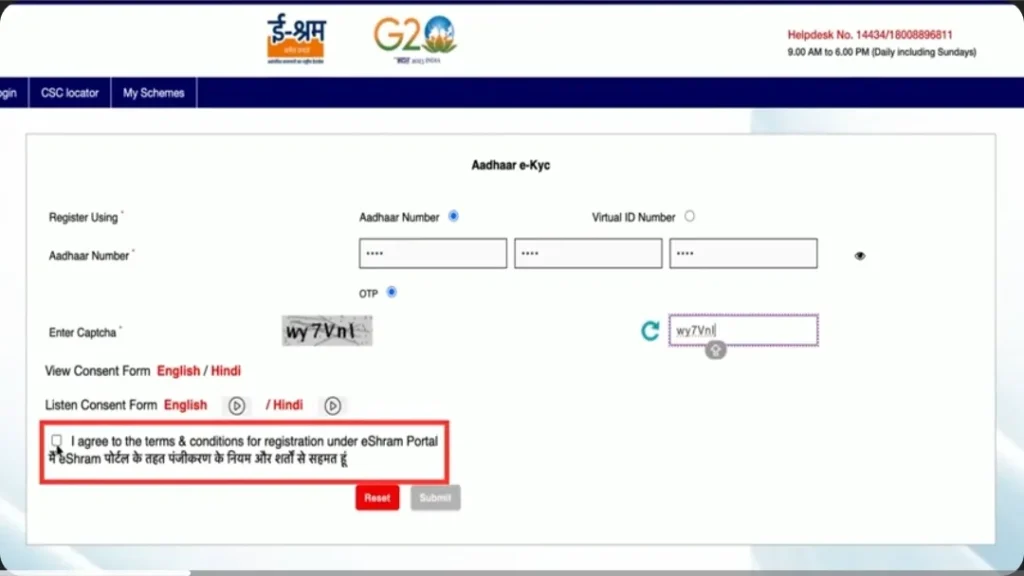
Simply select the Aadhaar number option and enter your Aadhaar number.
After entering the Aadhaar number, enter the captcha code, select the terms and conditions, and click ‘Submit’.
You can check this blog post to Learn how to E- KYC for E shram Card
Step 6: Complete Aadhaar Authentication
After completing Step 5, enter the OTP sent for Aadhaar verification and click ‘Validate’.
Step 7: Fill Your Details
On the next page, you will see several sections where you need to fill in various details.
You need to complete these details, such as:
- Personal information – e.g., mobile number, email, father’s name, mother’s name, etc.
- Nominee details – Details of the person you are applying for, such as name, date of birth (DOB), gender, etc.
- Residential details – Current address, state, area, PIN code, etc.
- Educational qualification – Information regarding education level, annual income, education certificate (optional), and income certificate (optional).
- Occupation and skills – Select “No” in the first row. You also need to select your job, job experience (duration of work), etc.
- Bank account details – Fill in all information related to your bank account.
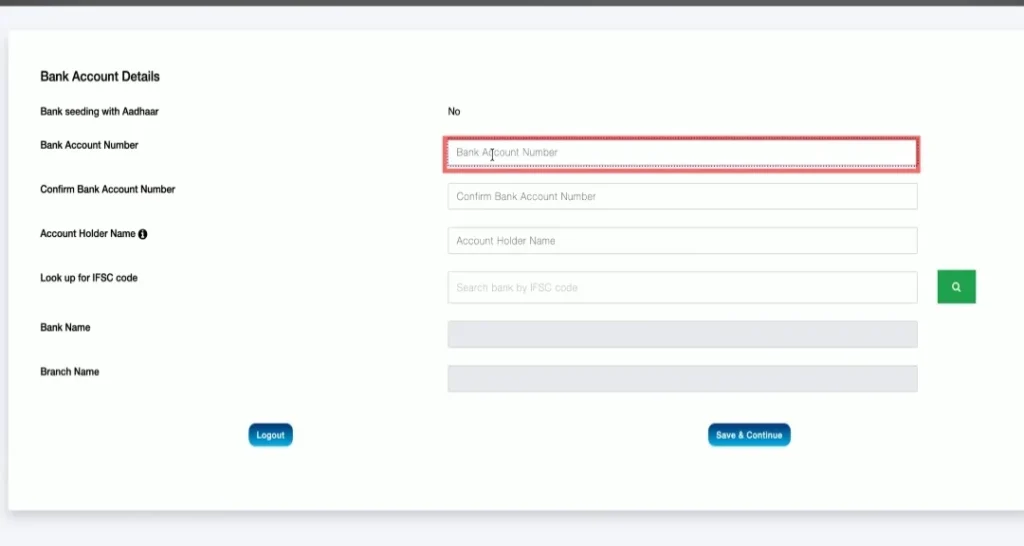
After filling in all these details correctly, simply click on “Save and Continue.”
Step 8: Submit Self Declaration
After clicking “Save and Continue,” you will see a preview or self-declaration page displaying the details you have entered.
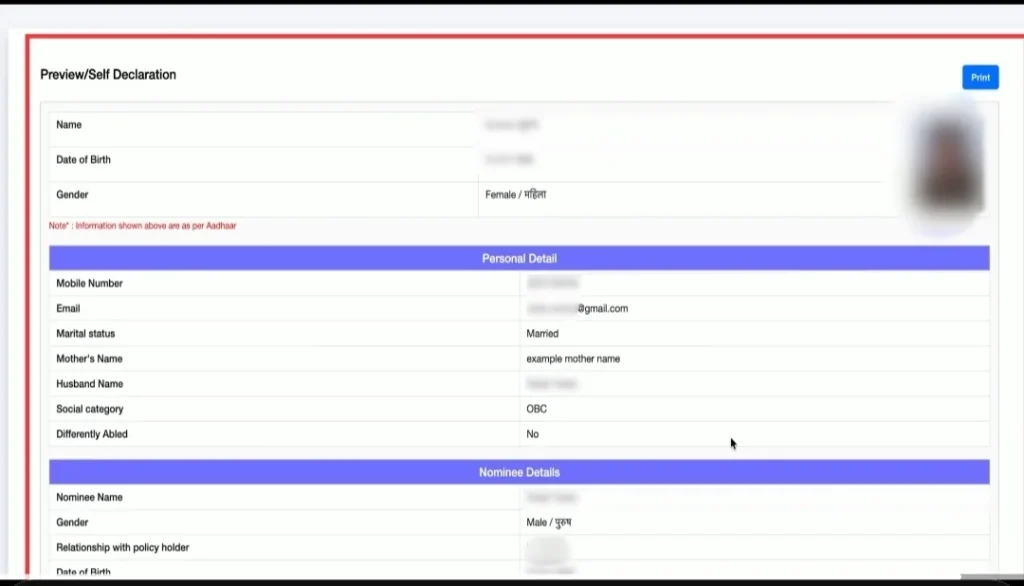
*Note: If you have entered any details incorrectly, you can correct them by using the edit option.
Double-check all your details, and if everything is correct, click on “Submit.”
Step 9: Download E-Shram Card
If you have followed all the steps I mentioned correctly, there is a 100% chance that your E-Shram Card will be generated successfully.
Now, simply download your E-Shram Card online.
You can also get a printout of it if you wish.
What to do after applying for e shram card?
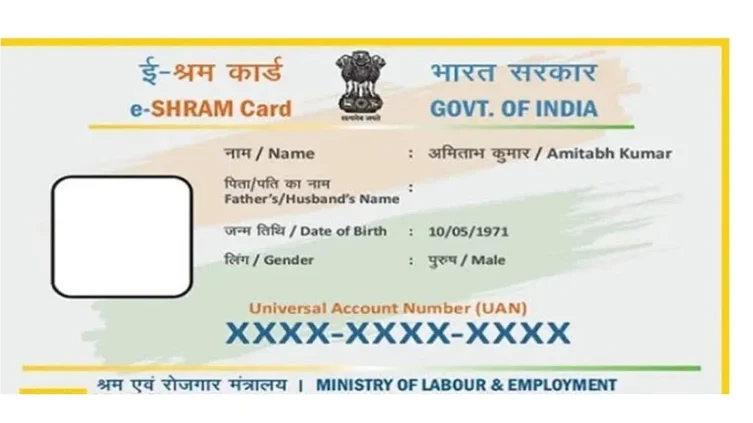
After applying for an e-Shram card, your e-Shram card will be ready at the bank.
You should keep your Identity Card safe and wait for government welfare schemes.
When the Indian government launches a new worker welfare scheme, you should apply for it.
If you need updates on this first, you can follow my blog – LawInsight (Linkkk)
You can also apply for the PM-SYM Pension Scheme, in which you can receive ₹3,000 per month after enrolling.
You should check the step-by-step process of Ayushman Card – Learn Now
Important documents for e shram card
You do not need a lot of documents to apply for the e-Shram card.
Mandatory Documents:
- Aadhaar Card
- Mobile number linked with Aadhaar
- Bank account number
- IFSC code of your bank branch
Additional Information Required
- Occupation/work details
- Educational qualification (if applicable)
- Skill details (if any)
| Document | Required |
|---|---|
| Aadhaar Card | ✅ Mandatory |
| Aadhaar-linked Mobile Number | ✅ Mandatory |
| Bank Account Number | ✅ Mandatory |
| IFSC Code | ✅ Mandatory |
| Occupation/Work Details | ✅ Required |
| Nominee Details | ✅ Recommended |
| Educational Qualification | Optional |
| Skill Certificate | Optional |
E Shram Card Download by Aadhaar Number
You can download your e-Shram card in the same way you applied for it.You can download it in just 5 minutes by following these simple steps:
- First, visit the official e-Shram portal.
- Log in to the official portal.
- Next, enter your linked Aadhaar number and the Captcha code.
- Then, verify the OTP.
- Enter your 12-digit Aadhaar number.
- Complete the Aadhaar verification by entering the OTP.
- After logging in, click on “Download UAN Card” to download it.
Common Mistakes to Avoid Before Applying for an E-Shram Card
Many people make common mistakes when applying for an e-Shram card.
If you are among them, avoid these errors during the application process to ensure your e-Shram card is generated successfully without any issues.
- Mobile Number Not Linked with Aadhaar: When applying for an e-Shram card, ensure you have the mobile number that is linked to your Aadhaar card.
- Name Mismatch with Aadhaar: For any government-related task, always use the exact name mentioned on your Aadhaar card to avoid errors like name mismatches.
- Entering Incorrect Bank Details: Providing accurate bank details is crucial because, if you become eligible for a welfare scheme, the funds will be deposited directly into your account.
- Selecting the Wrong Occupation: Before making a selection on the e-Shram card form, confirm which sector and occupation you are actually involved in.
- Applying Despite Being an EPFO or ESIC Member: Do not apply for an e-Shram card if you are a member of, or associated with, EPFO or ESIC, as this could lead to problems later on.
- Using Someone Else’s Mobile Number: If you enter someone else’s number in the Aadhaar-linked number section, Aadhaar verification will fail; therefore, ensure the number you use is linked to your Aadhaar.
- Not Reviewing Details Before Submission: It is essential to double-check the details entered for any government application, as rectifying errors in official records can be a difficult and troublesome process.
You can check – How to Correct PAN card details
Important FAQs of E-Shram Card in 2026
1. How many days are required for an e-Shram card?
The e-Shram card is usually generated instantly after successful registration and Aadhaar verification.
2. Can I get money from an e-Shram card?
Not directly. Financial benefits depend on eligibility under specific government welfare schemes.
3. Can a housewife get an e-Shram card?
Only if she works as an eligible unorganized worker or is self-employed.
4. What are the advantages of an e-Shram card?
It helps workers access welfare schemes, social security benefits, and employment-related opportunities.
5. What is the speciality of e-Shram card?
It provides a unique UAN number and creates a national worker identity database.
Conclusion
If you are genuinely serious about creating an e-Shram card yourself, you can get it done in less than 10 minutes by following the steps I have outlined.
I have shared everything related to the e-Shram card in this article; if you have read it carefully, you surely would have learned something new.
Sometimes, errors occur during the application process that cannot be resolved manually; if you encounter any such issues, please let me know in the comment.
“Register today, secure your future tomorrow“
Further Readings:
- Top 5 changes in Criminal Laws
- Get you Delhi domicile Certificate by these 9 easy steps
- PAN Card Correction Online in just 5 Minutes
Great content! Keep up the good work!
Thankyou ❣️